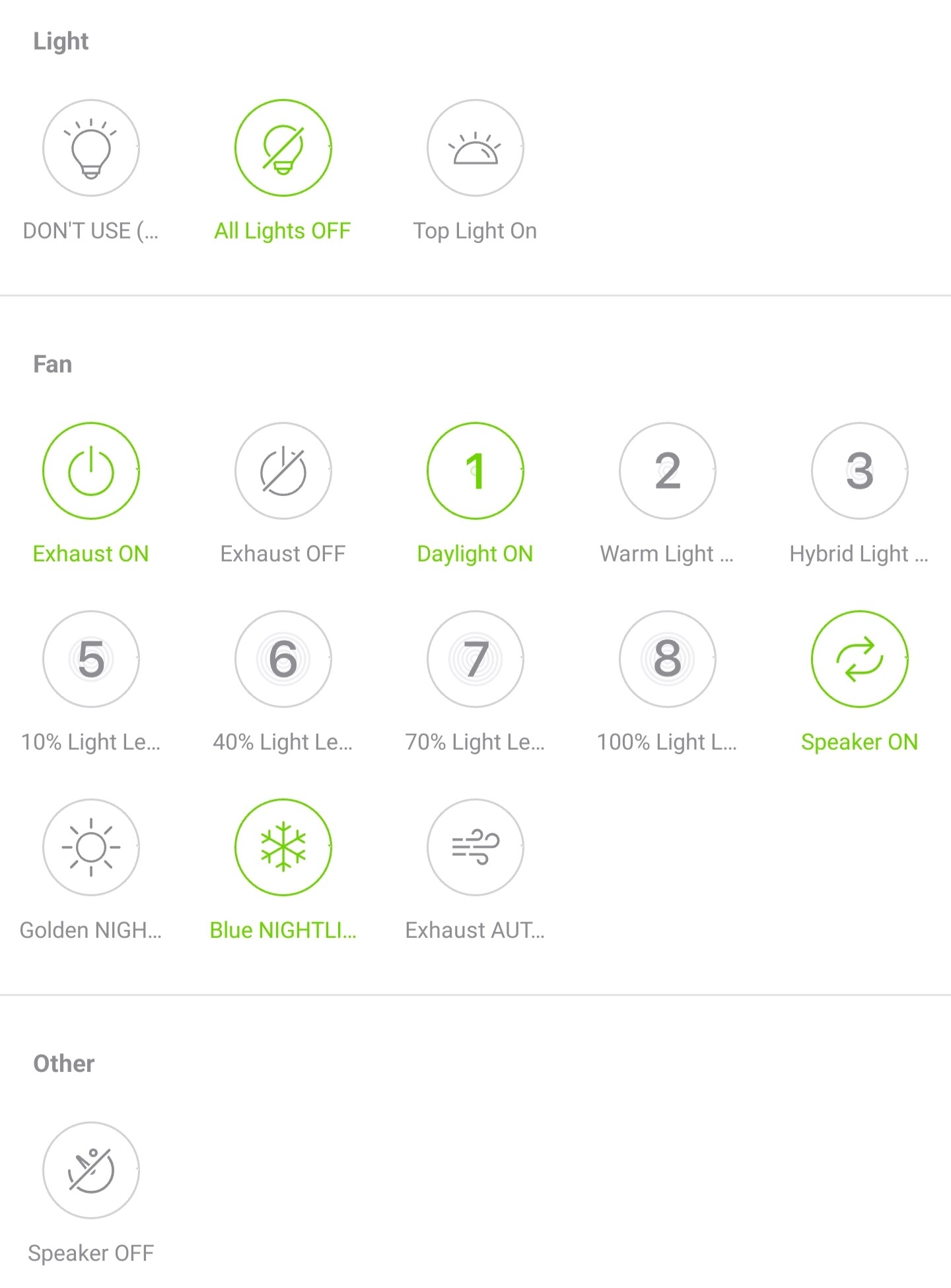
In my ongoing quest to expand “Generic Devices” beyond the three “Power Toggle, Power On, Power Off” buttons, and/or to continue co-opting my raw-recorded devices as various other kinds of devices (Fireplace, Ceiling Fan, etc) that Bond more readily supports, is it possible to get insight into all of the “icon slugs” available, for when we POST or PATCH a new Command?
I know that those are probably modified / expanded from time to time, but I have to assume there’s a pretty wide and solid base of them by now.
I have some mixtures of success and failures getting some generic devices set up just the way I want.
The Action to which a Command is mapped sometimes seem to limit what icon slugs are available to select, or even what Category Name can be assigned.
I think some of these limitations also apply to what States / Properties are allowed to be set as part of the command, too, but I haven’t fully investigated that enough.
I think I am beginning to see a need/desire for an Action that exists on any (raw-recorded) device that is essentially a “dummy” action, where any Category Name, icon slug, and State/Property can be configured via Patch (since we cannot add / modify Actions as far as I can tell).
I am slowly getting by with creating commands one by one via API, including their Signal payload, but it’s much more tedious than just Patching to a new Category Name and allowing any icon slugs and State/Property modifications.
As an example, I have a “ceiling fan” type device I raw-recorded which has many functions for lights, fan and speaker.
It is a bathroom exhaust fan with two different lights and the fan itself, plus a Bluetooth speaker.
While I can record commands for all of the OEM buttons, it does require using what would normally be “fan” commands to give additional buttons for commands that actually control lights or speakers.
I am slowly duplicating the same Device and its Signals with different Actions that allow me to assign the Category Name, unlike what I can do with the original raw-recorded Device. Sure, I can rename the Command without seemingly any limitations, but the icon slugs and Category Names seem hard-set or limited by the type of Action to which the Command is assigned.
Original Raw-recorded, showing a mixture of “fan” and “light” named commands in the Fan section:
Personally, I’d like to separate these into two distinct Categories - one called “Main Light” and one called “Night Light” (both of which would have a copy of a Command called ‘ALL Lights Off’ or similar which actually each sent the same Signal), but at least this is closer to what I want.
I believe you can perform a patch and change the Category Name using the “category_name” parameter parameter~
For custom state/properties, can you try setting it in the device creation?
Hope it helps!
Btw, can you share one or two commands you’re using to do it? Just to be sure we’re in sync
I’ve tried and it doesn’t seem to work for things that have an Action type associated with a Fan or Light - it just stays in Fan or Light Category (though it may accept the Command Name or icon slug change).
I’d also like to do custom Category Names but it is very dicey and specific to be able to get anything to accept that. One success so far on a Generic-type Device:
For custom Command creation on a Device vs PATCH’ing existing Commands on a Device, this is what is mostly working (you can see it doesn’t respect my ‘custom’ desired Category Name):
Command:
curl -H "BOND-Token: aaaaaaaaaaaaaaaa" -i http://x.x.x.x/v2/devices/6f4d3bae3f8e96c2/commands/ -X POST -d "{\"name\":\"Daylight ON\",\"category_name\":\"Main + Night Lights\",\"action\":\"TurnDownLightOn\",\"argument\":null,\"button_type\":\"tap\",\"feedback\":\"state.light==1 and state.down_light==1\",\"icon\":\"bottom_light_on\",\"hidden\":false
HTTP/1.1 200 OK
BOND-Flags: 4
Content-Length: 282
Content-Type: application/json; charset=utf-8

{"name":"Daylight ON","action":"TurnDownLightOn","argument":null,"button_type":"tap","category_name":"Light","feedback":"state.light==1 and state.down_light==1","icon":"bottom_light_on","hidden":false,"_":"3b5101d2","__":"29b5f70d","signal":{"_":"fa4321a7"},"tx":{"_":"00000000"}}
Command: (less important to my point about Category Names since it’s just the Signal, but just so you see the entirety of the steps I’m doing per Device Command)
curl -H "BOND-Token: aaaaaaaaaaaaaaaa" -i http://x.x.x.x/v2/devices/6f4d3bae3f8e96c2/commands/b92b897a82918f7a/signal -X PUT -d "{\"freq\":433940,\"bps\":40000,\"deviation\":0,\"reps\":1,\"modulation\":\"OOK\",\"encoding\":\"hex\",\"data\":\"FFFFFFFFFFFFFFFFFFFFFFFFFFFFFFFFFFFFFFFFFFFFFFFFFFFFFFFFFFFFFFFFFFFFFFFFFFFFFFFFFFFFFFFFFFFFFF800000000000000000000000000000000000000003FFFFFFFFFFFFFFFFFFFFFFFFFFFFFFFFFFFFFFFFFFFFE00000000000000000000000003FE003FFFFFFF001FFFFFFF000FF000FFFFFFF800FFFFFFF800FFFFFFFC00FFFFFFFC003FFFFFFE003FE003FFFFFFF000FFFFFFF000FF000FF800FF800FF800FF800FF800FF800FFFFFFFC007FC003FFFFFFE003FE003FFFFFFF003FF000FF000FFFFFFF800FFFFFFF800FF800FFFFFFFC007FC003FC003FFFFFFFFFFFFFFFFFFFFFFFFFFFFFFFFFFFFFFFFFFFFFF00000000000000000000000003FE003FFFFFFF003FFFFFFF800FF800FFFFFFFC007FFFFFFE003FFFFFFE003FFFFFFF000FFFFFFF800FF800FFFFFFFC00FFFFFFFC003FC003FC003FC003FC003FC003FC003FC003FFFFFFE003FE003FFFFFFF000FF000FFFFFFF800FF800FF800FFFFFFFC003FFFFFFC003FC003FFFFFFE003FE003FE003FFFFFFFFFFFFFFFFFFFFFFFFFFFFFFFFFFFFFFFFFFFFFF80000000000000000000000000FF000FFFFFFF800FFFFFFF800FF800FFFFFFFC003FFFFFFC003FFFFFFE003FFFFFFE003FFFFFFF000FF000FFFFFFF800FFFFFFF800FF800FF800FF800FF800FF800FF800FF800FFFFFFFC003FC003FFFFFFE003FE003FFFFFFF000FF000FF000FFFFFFF800FFFFFFF800FF800FFFFFFFC003FC003FC003FFFFFFFFFFFFFFFFFFFFFFFFFFFFFFFFFFFFFFFFFFFFFF00000000000000000000000003FE003FFFFFFF000FFFFFFF000FF000FFFFFFF800FFFFFFF800FFFFFFFC003FFFFFFC003FFFFFFE003FE003FFFFFFF003FFFFFFF000FF000FF000FF000FF000FF000FF000FF000FFFFFFF800FF800FFFFFFFC003FC003FFFFFFE003FE003FE003FFFFFFF000FFFFFFF000FF000FFFFFFF800FF800FF800FFFFFFFFFFFFFFFFFFFFFFFFFFFFFFFFFFFFFFFFFFFFFFE00000000000000000000000003FE003FFFFFFE003FFFFFFF000FF000FFFFFFF800FFFFFFFC00FFFFFFFC003FFFFFFE003FFFFFFF001FF000FFFFFFF800FFFFFFF800FF800FF800FF800FF800FF800FF800FF800FFFFFFFC007FC003FFFFFFE003FE003FFFFFFF000FF000FF000FFFFFFF800FFFFFFFC00FFC003FFFFFFE003FE003FE003FFFFFFFFFFFFFFFFFFFFFFFFFFFFFFFFFFFFFFFFFFFFFF80000000000000000000000000FF800FFFFFFFC00FFFFFFFC003FC003FFFFFFE003FFFFFFE003FFFFFFF000FFFFFFF000FFFFFFF800FF800FFFFFFFC00FFFFFFFC003FC003FC003FC003FC003FC003FC003FC003FFFFFFE003FE003FFFFFFF000FF000FFFFFFF800FF800FF800FFFFFFFC003FFFFFFE003FE003FFFFFFF000FF000FF000FFFFFFFFFFFFFFFFFFFFFFFFFFFFFFFFFFFFFFFFFFFFFFC0000000000000000000000000FFC003FFFFFFE003FFFFFFE003FE003FFFFFFF000FFFFFFF800FFFFFFFC00FFFFFFFC003FFFFFFE003FE003FFFFFFF001FFFFFFF800FF800FF800FF800FF800FF800FF800FF800FFFFFFFC003FC003FFFFFFE003FE003FFFFFFF000FF000FF000FFFFFFF800FFFFFFF800FF800FFFFFFFC003FC003FC003FFFFFFFFFFFFFFFFFFFFFFFFFFFFFFFFFFFFFFFFFFFFFF00000000000000000000000003FE003FFFFFFF001FFFFFFF000FF000FFFFFFF800FFFFFFFC00FFFFFFFC003FFFFFFE003FFFFFFF001FF000FFFFFFF800FFFFFFF800FF800FF800FF800FF800FF800FF800FF800FFFFFFFC007FC003FFFFFFE003FE003FFFFFFF003FF000FF000FFFFFFF800FFFFFFF800FF800FFFFFFFC00FFC003FC00380000000\"}
Did some investigation over here and looks like we override the commands info based on the selected action in every PATCH and POST into the commands endpoint, and in every boot.
For example, using TurnDownLightOn action, we override the button type to tap, category name to Light and the icon to bottom_light_on, as you probably already notice.
About states or properties, I can’t find any overriding, but worths mentioning that PATCHing is very restricted, so set it when POSTing. Let me know if you need more help with that, I can go deeper.
Can you try creating the command without a related action, just to check if it works as expected?
Is that a requirement? I personally would see more benefit in not having things overridden. Maybe it’s better for 90% of Bond customers to standardize, but I would say if you’re the kind of person who is POST’ing or PATCH’ing, you should be given more freedom and less Bond-enforcing-overrides.
I suppose I should map out each scenario very carefully. I can use these States, I think. Am I missing any?
And these correspond to the Feedback boolean expressions to see if the Icon should be lit up or dark?
state.timer
state.direction
state.down_light
state.flame
state.fpfan_power
state.fpfan_speed
state.light
state.open
state.power
state.speed
state.up_light
I’d kind of like the ability to make custom States (and even Actions!)- such as a “color” or “temperature” State for tracking bulb colors on Fans / Fireplaces / Lamps (and an Action to change it!).
I tried making an expression with a custom “feedback” State in a POST command creation, but it discarded any State which wasn’t known, it seems. "feedback\":\"state.light==1 and state.up_light==1 and state.down_light==0 and state.color_light==3400"
Thinking maybe I needed to PATCH a State to create a custom one, I ran into a different error response - so it basically reinforces the idea that States are only allowed if they already exist on the Device (perhaps even limited to the Type of device it is) / no custom States: {"_error_id":153,"_error_msg":"requested state does not exist"}